Direct Answer: What Makes B2B Lead Generation Predictable?
Predictable B2B lead generation relies on a connected operational engine rather than one-off campaign spikes. It requires four connected components: a validated Ideal Customer Profile (ICP), technical deliverability infrastructure, targeted multichannel messaging, and strict qualification standards.
When these elements operate with a continuous feedback loop between research and sales, monthly pipeline generation becomes a mathematical output rather than a guessing game.
Introduction
A company launches a cold email campaign, gets twenty booked calls in week one, and assumes they’ve cracked outbound.
By week four, open rates collapse, email domains get flagged for spam, and the few meetings that do happen turn out to be under-budget prospects. The founder blames the copywriters, the sales team blames the data list, and the campaign gets shut down.
This boom-and-bust cycle happens when organizations treat lead generation as a series of isolated tactics rather than an integrated business system.
They treat list building, email deliverability, messaging, and qualification as separate tasks owned by different people who rarely talk to each other.
Building a predictable lead generation engine requires a structured approach. Every stage must feed actionable data into the next. This guide breaks down the core architecture of a scalable outbound system and provides a concrete 90-day implementation roadmap.
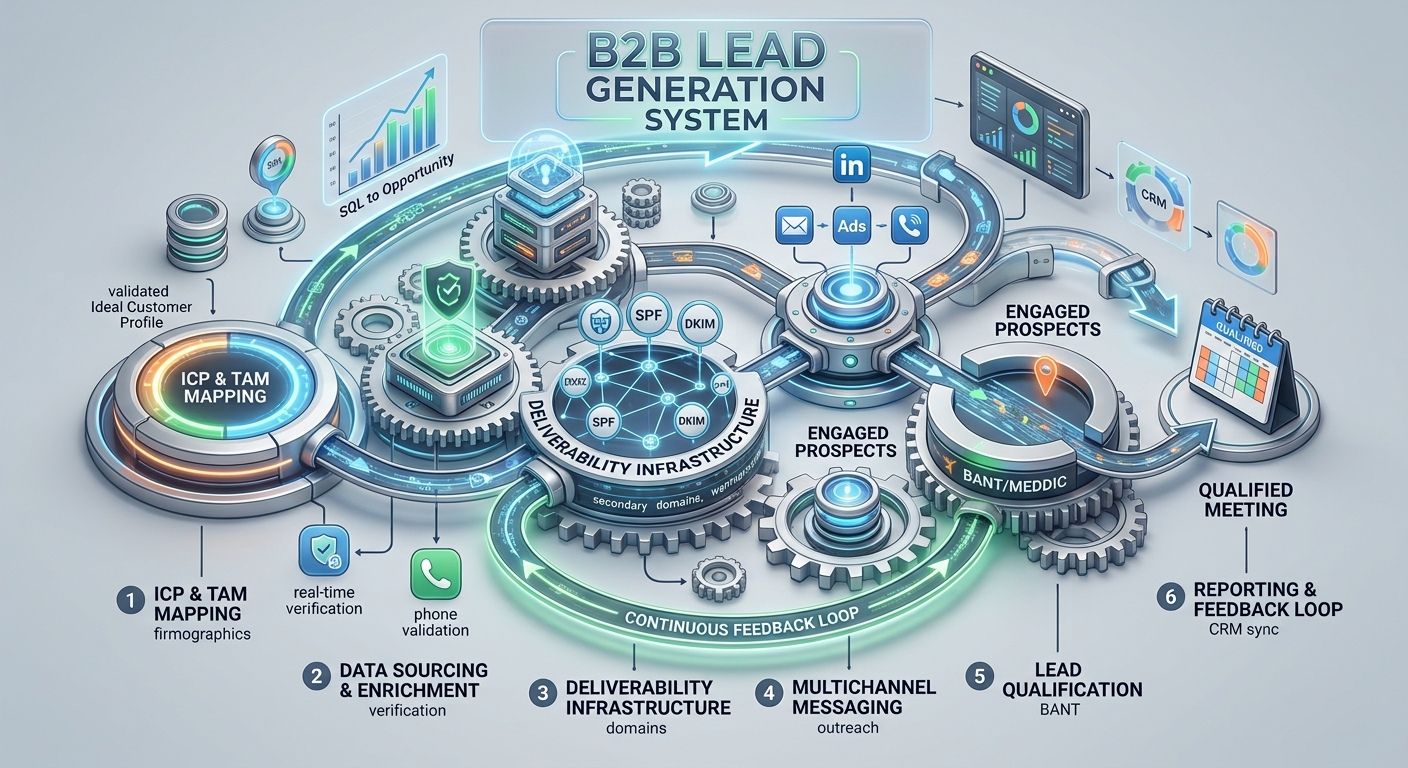
What Are the 6 Core Pillars of a Predictable Outbound System?
A reliable lead generation system consists of six interdependent operational pillars. If any single pillar fails, the entire pipeline suffers.
| Pillar | Focus Area | Why It Matters |
|---|---|---|
| 1. ICP & TAM Mapping | Firmographics, technographics, intent signals | Prevents wasting budget on wrong-fit accounts |
| 2. Data Sourcing & Enrichment | Real-time email verification, phone validation | Protects domain reputation; drives reply rates |
| 3. Deliverability Infrastructure | Secondary domains, warmup automation, DMARC | Ensures emails actually reach the inbox |
| 4. Multichannel Messaging | Problem-centric copy, Email + LinkedIn + Retargeting Ads + Voice Drops | Cuts through noise; meets prospects where they are |
| 5. Lead Qualification | BANT (Budget, Authority, Need, Timeline) or MEDDIC-style verification before calendar invite | Protects AE time; improves close rates |
| 6. Reporting & Feedback Loop | CRM sync, weekly pipeline review, iteration | Turns data into systematic improvement |
Phase 1: How Do You Define the ICP and Buying Committee?
You cannot build a predictable system on a vague target. “SaaS companies with $5M+ revenue” is not an ICP. That is a market segment.
A functional ICP for outbound requires three layers of definition:
- Firmographics: Employee count range, revenue range, geography, tech stack (e.g., “Salesforce + HubSpot users”), funding stage.
- Situational Triggers: Recent VP of Sales hire, new funding round, product launch, office expansion, competitor contract renewal window.
- Buying Committee Personas: Map 3-5 roles per account. For a B2B sales tool: VP Sales (champion), CRO (budget), RevOps (technical eval), CFO (sign-off).
Action Item: Build a “Tier 1” list of 500-1,000 accounts matching all three layers. This becomes your high-priority testing ground.
Phase 2: How Do You Map the Addressable Market (TAM)?
Once the ICP is defined, calculate the Total Addressable Market (TAM) within your operational constraints.
- Total TAM: Every company globally matching firmographics.
- Serviceable Available Market (SAM): Companies matching firmographics + triggers in your target geos/languages.
- Serviceable Obtainable Market (SOM): Realistic accounts you can engage in the next 12 months given your SDR (Sales Development Representative) capacity.
Benchmark: A single full-cycle SDR can effectively manage 150-200 active accounts per quarter. Size your SOM accordingly. Factor in ramp time too — the Bridge Group’s 2025 SDR benchmarking research puts average SDR ramp at 3.2 months to first qualified meeting, with average tenure around 15 months, so a newly hired SDR won’t hit full account capacity on day one.
Phase 3: How Do You Build and Validate Prospect Data?
Data decay is the silent killer of outbound programs. B2B contact data continuously decays as people change roles and companies, switch email providers, and move between organizations — and lists that go unverified for a full quarter typically show visibly higher bounce rates than freshly built ones.
The Waterfall Verification Approach:
- Primary Source: LinkedIn Sales Navigator / Apollo / ZoomInfo for initial list pull.
- Enrichment: Clay, Dropcontact, or similar for missing mobile numbers and personal emails.
- Verification: Real-time SMTP check (ZeroBounce, NeverBounce) + Catch-all filtering + Phone validation.
- Hygiene Schedule: Re-verify entire active list every 60 days.
Metric to Watch: Hard bounce rate is the earliest warning sign of list decay. Most deliverability practitioners treat 2% as the point to start investigating and 3%+ as a signal to pause sending and re-verify — treat these as operating guardrails rather than fixed industry law, and tighten them further if your own domain reputation is already fragile.
Phase 4: How Do You Prepare Email Infrastructure and Deliverability?
Sending cold email from your primary corporate domain (company.com) is a career-limiting move. One spam complaint wave can blacklist your transactional emails (invoices, password resets, support tickets).
Required Infrastructure:
- Secondary Domains: Purchase 3-5 lookalike domains (e.g.,
getcompany.io,trycompany.co,companyhq.com). - Mailbox Setup: 2-3 mailboxes per domain. Google Workspace or Outlook 365 only.
- Warmup Protocol: A workable example operating model is 14-21 days of automated warmup (Smartlead, Instantly, Warmup Inbox) before any cold sending, starting at 5 emails/day per mailbox and ramping to roughly 30-40 — adjust the exact pace to your domain age, sending reputation, and mailbox provider guidance rather than treating these numbers as fixed.
- Authentication: SPF, DKIM, DMARC (p=quarantine then p=reject) configured on every sending domain.
- Monitoring: Google Postmaster Tools + Microsoft SNDS connected for every domain.
Phase 5: How Do You Develop Messaging for Each Segment?
Generic value propositions (“We help you grow revenue”) get deleted. Specific problem statements get replies.
Messaging Matrix Template:
| Segment | Primary Pain Point | Hook (First Sentence) | Call to Action |
|---|---|---|---|
| VP Sales, 50-200 emp | “Reps spend 60% time on admin, not selling” | “Most VPs I talk to at 100-person SaaS firms say their reps waste 15 hrs/week on CRM entry.” | “Open to a 10-min idea exchange?” |
| RevOps, Enterprise | “Forecast accuracy below 70%” | “Forecast calls at $50M+ ARR companies usually stall because pipeline data is messy, not because reps are bad.” | “Worth a brief chat?” |
Rule: One email, one idea, one CTA. No links in first touch. No attachments.
Phase 6: How Do You Build a Multichannel Outreach Sequence?
Email-only sequences yield diminishing returns. Coordinated multichannel outreach (email + LinkedIn + retargeting ads + voice drops) can outperform email-only campaigns, although the size of the lift varies significantly by audience and execution.
Sample 15-Day Sequence (Touchpoints = 8):
| Day | Channel | Action |
|---|---|---|
| 1 | Problem-centric value prop, soft CTA (interest) | |
| 2 | Connection request (no note) | |
| 3 | Profile view + engagement on prospect’s post | |
| 5 | Follow-up: Case study / relevant insight (reply-based) | |
| 7 | Message after accept: Contextual relevance, soft ask | |
| 10 | “Closing the loop” – permission to close file | |
| 12 | Retargeting Ads / Voice Drops | Serve brand value via digital ads or leave a personalized audio drop to non-responders |
| 15 | Final engagement: Comment on company news |
Phase 7: How Do You Define Qualification Criteria (SQL Definition)?
A “meeting booked” is not a lead. A Sales Qualified Lead (SQL) meets agreed criteria before the calendar invite is sent.
Standard SQL Checklist (Customize per Client):
- Confirmed ICP Fit: Company size, industry, tech stack verified.
- Decision Authority: Prospect is Champion, Budget Holder, or Influencer.
- Expressed Pain: Explicitly mentioned a problem you solve.
- Timeline: Evaluation or purchase intent within 6 months.
- Budget Signal: Confirmed budget exists or willingness to build business case.
Process: SDR qualifies via email/LinkedIn replies before sending Calendly link. If criteria not met, nurture instead of booking.
Phase 8: How Do You Create a Lead Handoff Process?
The moment a meeting is booked, the risk of no-show or miscommunication spikes without a structured handoff. Published B2B benchmarks put no-show rates on SDR-booked meetings well above 20% when reminder sequences aren’t automated — one of the strongest arguments for treating handoff as a formal process step, not an afterthought.
Handoff Protocol:
- Calendar Invite: Includes Zoom link, prospect LinkedIn, company one-pager, and 3 talking points for AE.
- CRM Task: Auto-create “Pre-Call Prep” task assigned to AE (due 2 hours before call).
- Reminder Sequence: Automated 24h + 1h email/SMS reminders to prospect with “Add to Calendar” fallback.
- No-Show SOP: If prospect misses, SDR owns immediate re-booking attempt (call + email within 30 mins).
Phase 9: Which Pipeline Metrics Should You Track?
Predictability comes from measuring leading indicators, not just lagging revenue.
Weekly Dashboard (Leading Indicators):
- Emails Sent / Delivered / Opened / Replied
- Positive Reply Rate (varies widely by industry and list quality — track your own trend rather than chasing a fixed number)
- Meetings Booked / Meetings Held / No-Show Rate
- Pipeline Generated ($ value of SQLs created)
Monthly Dashboard (Lagging Indicators):
- SQL-to-Opportunity Conversion Rate
- Average Deal Size (Sourced vs Inbound)
- Sales Cycle Length (Sourced)
- Customer Acquisition Cost (CAC) Payback Period
Phase 10: How Do You Use Feedback to Improve Targeting and Messaging?
The feedback loop is where most systems break. AEs complain about lead quality; SDRs complain about “bad lists.” Neither has data.
Weekly 30-Minute Sync Agenda:
- Review last week’s “No-Show” and “Disqualified” meetings. Why? (Wrong persona? Bad timing? Weak pain?)
- Identify top 3 objections heard on calls. Update email copy to pre-address them.
- Flag 5 accounts that closed-won. Analyze: What trigger did they have? What messaging resonated? Replicate in ICP.
- Review domain health: Any bounce spikes? Spam complaints? Pause and rotate if needed.
What Does Each Stage of the System Require to Function?
Here’s the operational breakdown — what goes in, what comes out, and who owns each stage:
| Process Stage | Required Input | Output | Primary KPI | Responsible Role | Common Failure | Corrective Action |
|---|---|---|---|---|---|---|
| ICP & TAM Mapping | Firmographic and intent data sources | Defined ICP + Tier 1 account list | % of accounts matching all 3 ICP layers | RevOps / Sales Leadership | ICP defined as a market segment, not a real profile | Add situational triggers and buying-committee mapping |
| Data Sourcing & Verification | Tier 1 account list | Verified, enriched contact list | Hard bounce rate (guardrail: investigate above 2%) | SDR / Data team | Skipping re-verification after the 60-day mark | Rebuild the waterfall verification cadence |
| Deliverability Infrastructure | Satellite domains and mailboxes | Warmed, authenticated sending domains | Inbox placement rate (aim as close to 100% as possible; investigate drops) | RevOps / IT | Sending cold email from the primary corporate domain | Migrate to secondary domains with SPF/DKIM/DMARC |
| Multichannel Messaging | ICP personas, confirmed pain points | Messaging matrix and sequence copy | Positive reply rate | SDR / Copywriter | Generic value propositions with no segment specificity | Rewrite around one segment-specific pain point per email |
| Lead Qualification | Positive replies | Sales-Qualified Leads (SQLs) | SQL-to-Opportunity conversion rate | SDR | Booking calendar invites before qualifying | Enforce the SQL checklist before any calendar link goes out |
| Reporting & Feedback Loop | Weekly campaign and CRM data | Documented playbook adjustments | Reply rate trend, CAC payback period | RevOps / Sales Leadership | No structured loop between AE and SDR feedback | Institute a recurring weekly pipeline sync |
What Does a 90-Day Implementation Roadmap Look Like?
Use this roadmap to launch a predictable outbound engine from zero.
| Period | Primary Focus | Key Actions | Gate Criteria to Advance |
|---|---|---|---|
| Days 1-30 (Research) | Foundation & Infrastructure | Finalize ICP & buying committee; purchase and warm domains; build initial list via the waterfall; write messaging matrix and sequences | ICP doc signed off; 3 domains warmed; 500 contacts verified (bounce rate under control); sequence copy approved |
| Days 31-60 (Launch) | Launch & Test | Launch sequences at 50% volume; monitor deliverability daily; A/B test hooks and CTAs; qualify and hand off first SQLs | Positive reply rate trending upward week over week; inbox placement holding steady; first meetings booked |
| Days 61-90 (Scale) | Optimize & Scale | Double sending volume (max safe rate); refine ICP from closed-won data; document playbooks; hire/onboard a 2nd SDR or expand agency scope | Reply rate and show rate both improving versus your Day 30-60 baseline; cost per meeting trending toward your target |
Risk Mitigation per Phase:
- Days 1-30 Risk: Domain blacklisting. Fix: Strict warmup, max 30 emails/day/mailbox.
- Days 31-60 Risk: Low reply rates. Fix: Pause, rewrite hooks, re-verify list, test new angles.
- Days 61-90 Risk: Quality dilution at scale. Fix: Enforce qualification checklist; audit 20% of booked meetings weekly.
When Should You Build Internally vs. Use a Provider?
Not every company needs to build this machine from scratch.
Build Internally When:
- You have a dedicated RevOps/Sales Enablement function.
- Your Annual Contract Value (ACV) is high enough to justify deep, product-specific expertise in every conversation — commonly the case above roughly $50K ACV, though this depends heavily on sales complexity, not just deal size.
- You have 12+ months runway to absorb ramp costs.
- Data sensitivity/compliance requires air-gapped infrastructure.
Use a Specialized Provider When:
- You need pipeline impact in 60 days, not 6 months.
- You lack internal deliverability expertise (SPF/DKIM/DMARC, warmup, rotation).
- You want to test 2-3 verticals simultaneously without hiring separate teams.
- Your deal economics support an outsourced cost-per-meeting or retainer model — commonly a fit in the roughly $15K-$50K ACV range, though this varies by margin and sales cycle length.
Companies that do not want to build this infrastructure internally can use a specialized provider. SalesAR’s B2B lead generation approach, for example, combines data waterfalls, domain infrastructure, and multichannel sequencing so the internal team can focus on qualified conversations and closing instead of building it from scratch.
What Does It Actually Take to Make Lead Generation Predictable?
Predictable lead generation is not magic. It is the discipline of treating outbound as an engineering problem: define inputs, control variables, measure outputs, iterate systematically. Companies that master this stop asking “will we hit quota?” and start asking “how many SDR pods do we need to hit the new target?”
The roadmap above works whether you execute it with internal hires, a hybrid model, or a specialized agency. The mechanics remain identical. The only variable is who turns the crank.